Architecture |
Top Previous Next |
|
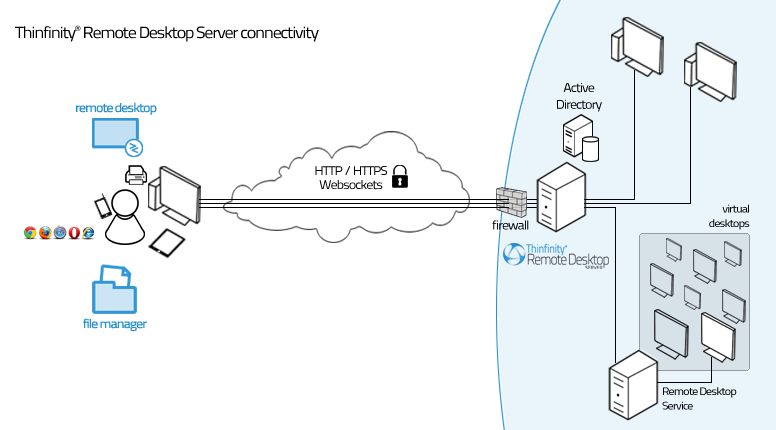
Thinfinity® Remote Desktop Server is composed of:
Thinfinity® Remote Desktop Server is a secure, high-performance HTTP / WebSockets server, which serves the web pages needed to run the Thinfinity® Remote Desktop Web Client on the web browser. When the end-user accesses the Thinfinity® Remote Desktop main page and enters the appropriate connection parameters, the Thinfinity® Remote Desktop Web Client communicates with the server, using Ajax and WebSockets (if available) to start the connection to the remote-end. Once the connection is established, the server will receive RDP commands, optimize them for the web, and send the resulting data stream to the Thinfinity® Remote Desktop Web Client.
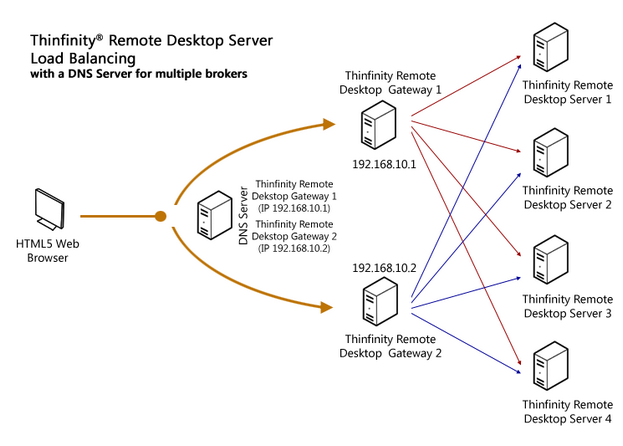
Load Balancing Architectures for Thinfinity® Remote Desktop Server: Thinfinity® Remote Desktop Server can be configured in two different load balancing architectures:
Read more about load balancing. Requirements: Using Thinfinity® Remote Desktop Server, any Windows, Mac OS X, Linux, Android and iOS user can remote into a Windows desktop or work with a single Windows application. Web Client
– Internet Explorer 9.0, 10.0, 11.0 – Firefox 17+ – Chrome 22+ – Safari 6.0.1+ – iOS 5.1.1+ – Android 2.3, 4.0+ – Edge 38+ Server Machine
This help system was created with an evaluation copy of Help & Manual. |